

Service & Support
Most problems can be sorted out without sending anything in. Run the two-minute check, find your product below, and if it still isn't right, start a claim and we'll fix it.
Before you ship anything
The two-minute check
A wireless mic is a chain: headset, transmitter, receiver, mixer. When the sound goes wrong, one link has failed. These three checks find it, and often fix it.
1. Fit a fresh battery
A brand-new alkaline, not one from the drawer (or a full charge on a UTX). A tired battery causes dropouts and short range well before the transmitter shuts off.
2. Watch the receiver
Switch the transmitter on and look at the receiver's RF lights. Lights on: the radio link is good, so look at the headset or the mixer. No lights: look at the channel or the transmitter.
3. Swap one part
Try another headset on the same transmitter, or your headset on another transmitter. The fault follows the bad part. Tell us what you found and we can usually diagnose it by email.
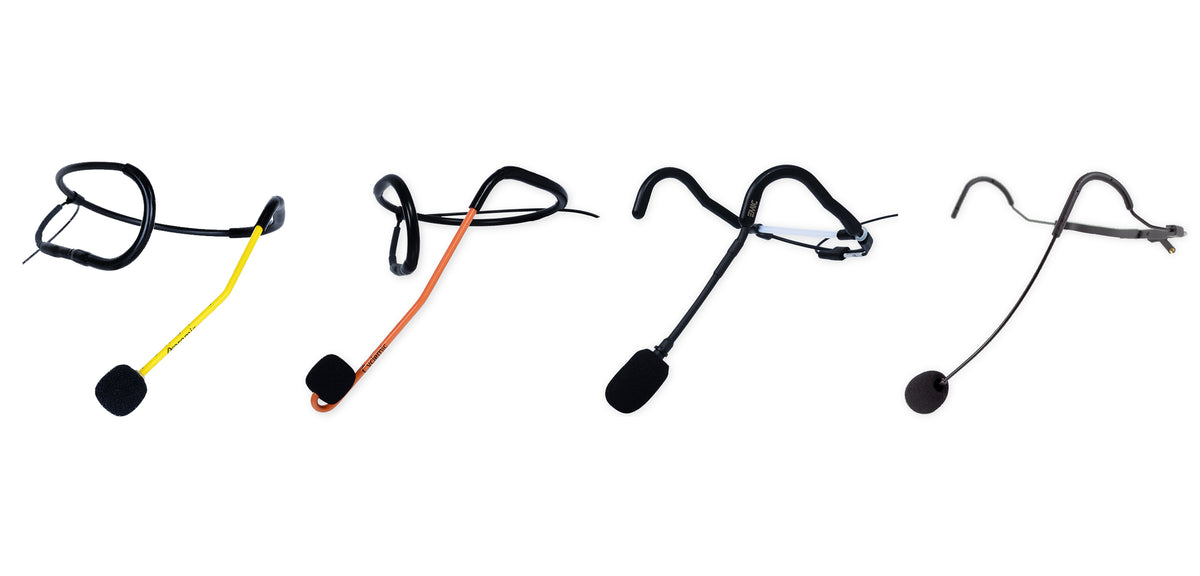
Aeromic
2-year Sweat Death Warranty. Crackle or dropouts? Start at the connector: clean the pins, re-apply eGloop, push it straight back in.
Cyclemic
2-year Sweat Death Warranty. Sounds dull or muffled? Swap the windscreen and let the capsule dry before the next ride.
EMic
12-month warranty, rated for 20 classes a week. If it fades after back-to-back classes it needs drying time. Rotate two mics on heavy days.
FM41
12-month warranty, rated for 7 classes a week. The cable is replaceable, so a cable fault doesn't mean a new headset. Ask us for the right one.
Aeromic, Cyclemic, EMic, FM-41
Headset mics
Most headset trouble starts at the connector, and the windscreen is the next thing you can fix yourself. Work through these in order.
Crackling, static, or cutting in and out
Start at the connector. Sweat runs down the cable and sits on the pins, and corroded pins make a poor contact.
1. Unplug the mic and look at the pins. Green, white or dull grey deposits are corrosion.
2. Clean the pins with contact cleaner (DeOxit or similar) and let them dry.
3. Re-apply eGloop. A small dab of eGloop at the base of the connector. Cleaning strips the protective coating, and the sweat warranty requires it.
4. Plug back in. Push it straight in until it seats fully.
Still crackling? Talk into the mic while you gently flex the cable where it enters the connector, then where it meets the frame. If the noise follows the flex, the cable has failed at that point and the mic needs a bench repair.
No sound at all
First work out whether it's the mic or the rest of the chain.
1. Check the receiver's RF lights with the transmitter switched on. No lights means a transmitter or channel problem, so skip to the transmitter section.
2. Try a different headset on the same transmitter. If that one works, your mic is the fault.
3. Check the connector matches the transmitter. A mic wired for one brand of transmitter may not work on another. If you have changed systems, use the connector finder.
Muffled, dull, or quieter than it used to be
Usually a saturated windscreen. Sometimes a capsule that hasn't had time to dry, or one that has drifted away from your mouth.
1. Pull the windscreen off and test without it. If the sound comes back, fit a fresh one. Windscreens are model-specific, so pick your headset when you order.
2. Let the mic dry. Hang it in open air overnight. Not in a bag, a drawer or a closed case.
3. Check where the capsule sits. Fitness headset capsules are built to reject sound that isn't close, so position matters. Keep the capsule right at the corner of your mouth, not out in front or down by your chin.
Feedback or squealing
Feedback comes from the room and the settings. It isn't a mic fault.
Move away from the speakers and never teach from in front of them. Turn down the treble on the voice channel (on an Aeromix, the voice treble control). Keep the capsule close to your mouth so the system needs less gain.
If a room still rings, email us what speakers and mixer you have and where they sit. We'll help you set it up.
Cuts out when I turn my head or move
If the dropout follows your movement and not your position in the room, something is loose or a wire is breaking.
1. Reseat the connector. Unplug it and push it straight back in until it seats fully.
2. Check the cable isn't pulled tight between the headset and the transmitter when you move.
3. Flex the cable gently while you talk. A dropout you can trigger by flexing is a cable fault, and that's a repair.
If it only happens in certain parts of the room, that's wireless range or interference. See the transmitter section.
Bent frame, loose boom, or physical damage
Drops, bends and chewed cables are physical damage, which the sweat warranty doesn't cover. Send us a photo before you ship anything. We'll tell you whether it can be repaired and roughly what it will cost.
The FM-41 is the exception on cables: its cable is replaceable, so a cable fault doesn't mean a new headset.
Windscreen is discolored or smells
Replace it. Windscreens are consumable. Wash them weekly, let them dry fully before they go back on, and fit a new one every few weeks, sooner if it stays discolored or holds moisture. A saturated windscreen holds sweat against the capsule.
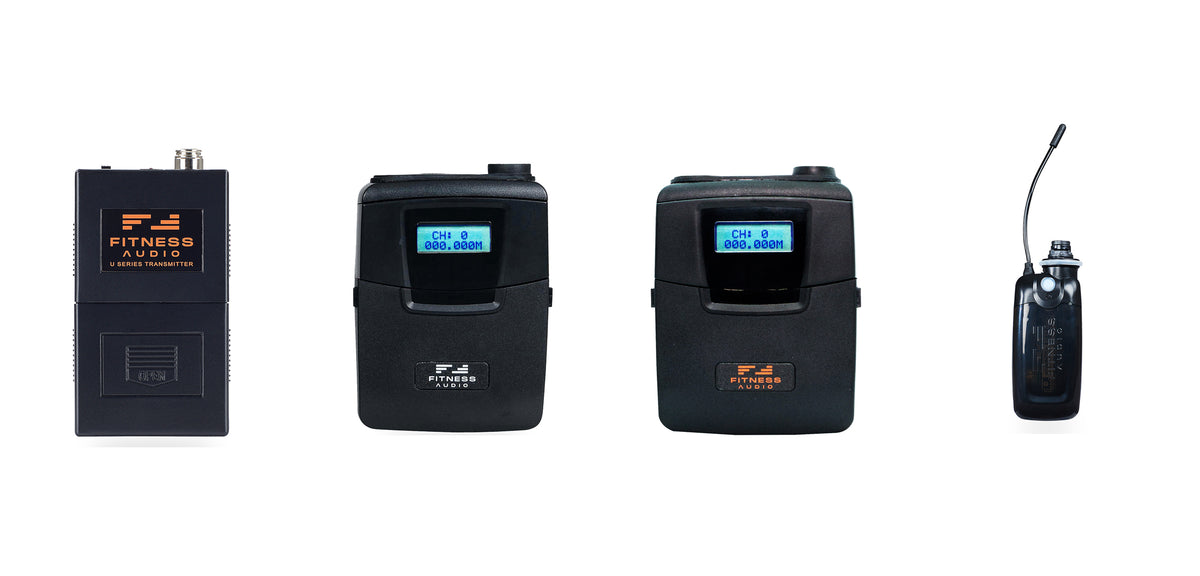
U-Series
Red light flashes once at power-on: normal. Stays on: battery low. No flash: battery flat or not making contact.
DX6
Rechargeable batteries? Set Battery Type to NiMH. Standard alkalines? Set it to AKLN. The wrong setting causes power problems.
UTX
Rechargeable beltpack. If it won't last a full class, note how long it runs from a full charge and tell us when you start a claim.
MTU8
Blue light on: power is good. Flashing: battery low. No light: battery flat or in backwards. One AAA runs about 5 hours.
On-head mini transmitter
MTU8
The MTU8 rides on the hottest, wettest part of your body. Start with battery, channel and drying time.
Won't turn on, or no blue light
1. Fit a brand-new alkaline AAA and check it's the right way round.
2. Look at the battery contacts. If they are dull or green, clean them with contact cleaner on a cotton swab and add a trace of eGloop.
3. Check the battery cover closes fully. A cracked or missing cover lets the battery lose contact when you move. Replacement covers come as a 2-pack.
No light with a fresh battery and clean contacts means it needs the bench.
Blue light is flashing
The battery is low. One AAA runs about 5 hours, so start each teaching day with a fresh one instead of finishing yesterday's.
Light is on but there's no sound
1. Look at the receiver. If no RF lights come on when the MTU8 powers up, the two aren't on the same channel. Set the MTU8's channel selector to match the receiver.
2. Check the frequency group. The MTU8 and the receiver must be the same group (for example SU520A). A different group won't connect on any channel.
3. RF lights on? Then the radio link is fine, and the headset is the more likely culprit. It's the wear part in any wireless system. Push the mic lead fully into the MTU8, then try another headset.
4. Check what comes after the receiver: the cable to the mixer, the mixer's mic channel, and any mute buttons.
Dropouts, static, or short range
1. Fresh battery first. Range falls as the battery does.
2. Free the antenna wire. It should hang clear, not coiled, knotted or tucked under the headband or a wrap.
3. Check the receiver's antennas. Both fitted, both pointing up, with the receiver out in the open. If it lives in a rack, the antennas belong on the front. Our rackmount kit includes the extension cables.
4. Look for a second transmitter on your channel. Two transmitters on one channel will wreck each other. Make sure the last instructor's pack is switched off and the room next door is on a different channel.
5. Change channel. Move the MTU8 and the receiver to a new channel together.
Cuts out when I move or jump
Something is loose. Check three things.
1. The mic lead is pushed fully home in the MTU8.
2. The battery cover is shut tight, so the battery can't bounce off its contacts.
3. The mounting bracket screws are snug, so the transmitter isn't rocking on the frame.
A cracked bracket is a cheap fix. The replacement mounting frame comes with brackets for the EMic and for the Aeromic and Cyclemic.
Fine at the start of class, dead by the end
If a fresh battery doesn't cure it, moisture is getting in faster than it can dry out.
Each MTU8 is rated for up to 3 non-consecutive classes a day, so back-to-back classes need two units in rotation. Let it air-dry fully between uses, never sealed wet in a gym bag.
For hot or heavy-sweat formats, the Yoga Wrap puts a neoprene barrier between your scalp and the transmitter.
If it has quit after a soaking, take the battery out, leave the cover off for a day so it can dry, and test again before you send it in.
What's covered on an MTU8
Sweat-related electronic faults are covered for 1 year from purchase. Wear and physical damage are not: broken battery tags, cracked covers, worn switches, damaged plugs. Most of those are inexpensive repairs, and covers and brackets are parts you can swap yourself. Full terms are on the warranty page.
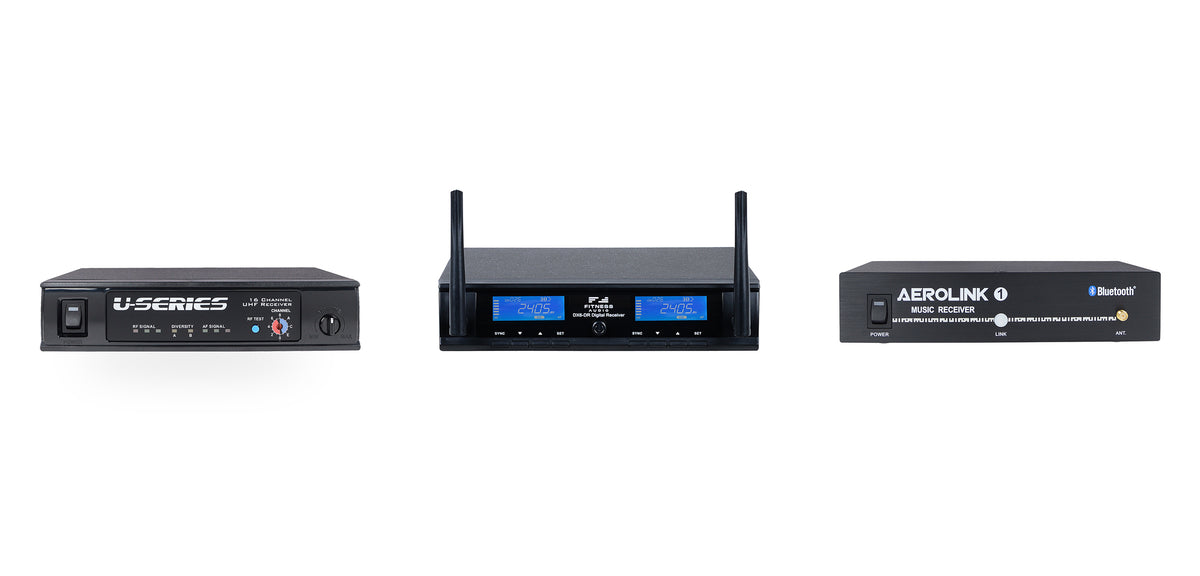
U-Series
Power light on, both antennas up. With the transmitter on you should see RF lights and an A or B diversity light. No lights means the channels don't match.
DX6
Power light on, antennas secure and upright. The RF indicators should light when the transmitter is on. If not, check the channel, then the transmitter's battery setting.
AeroLink
Won't pair? The last instructor's phone may still be holding the connection. Turn Bluetooth off on that phone, or forget the AeroLink on yours and pair again.
U-Series SDR-5616
Receiver quick check
If the transmitter checks out, look here before you box anything up. Channel setup is in the U-Series manual (PDF).
No lights at all
Check the power adapter is pushed in at both ends and the outlet is live. If the rack runs from a switched power strip or sequencer, check that is on too. Power supplies carry a 12-month warranty.
Power is on, but no RF lights when the transmitter is on
The transmitter and receiver aren't on the same channel, or aren't the same frequency group. Match the channel first. If that doesn't do it, compare the group code on both units.
With a good link you should see RF signal lights and either the A or B diversity light.
RF lights are on, but nothing from the speakers
The radio link is good, so the fault is after the receiver. Check the cable from the receiver to the mixer, that the mixer's mic channel is up and not muted, and that the receiver's own output hasn't been turned down. If you have the cable for it, try the receiver's other output (XLR or 1/4 inch).
Range has dropped, or there's noise when the transmitter is off
Check the squelch control hasn't been moved. Set too high, it shortens range. Set too low, it lets noise through when the transmitter is off. Also check both antennas are finger-tight and upright.
Prevention
Four habits that keep gear off our bench
Sweat is what kills fitness mics, and it does it slowly. These take a minute a day.
Wipe it, hang it
Wipe the connector dry after every class and hang the mic in open air. Don't store it wet in a bag, drawer or closed case, and don't wrap the cable tight around the transmitter.
Protect the pins
Once a month, clean the transmitter connector pins with contact cleaner and re-apply eGloop. It's the same protectant our technicians put on every transmitter before it ships.
Wash and replace windscreens
Wash weekly, dry fully, and replace every few weeks. They are the cheapest protection the capsule has.
Rotate on heavy days
More than 3 classes a day on one mic or one MTU8 shortens its life. Two in rotation, one drying while the other works, can more than double the life of both.
Still not right?
How service works
If the checks above didn't fix it, we will. Warranty repairs are carried out by the original Aeromic technicians. Anything outside warranty is quoted before work starts.
1. Start a claim
Open a claim in the Service & Warranty Portal. Tell us exactly what happens and what you have already tried. "RF lights on, no audio, same with two headsets" gets fixed faster than "doesn't work".
2. Wait for your claim sheet
We check your coverage and send a printable claim sheet with the shipping address. Please don't ship without one.
3. Pack the whole chain
If you couldn't pin down the faulty part, send the headset and the transmitter together so we can test them as a pair. Take the battery out, and put the claim sheet in the box.
4. We test, then quote or fix
Everything gets a bench test and you get an email with what we found. Warranty faults are repaired or replaced. Anything else gets a quote first, and nothing goes ahead without your OK.
Email us
Monday–Friday, 10AM–4:30PM Pacific. Most questions answered within 24 hours.
Send us a video
Ten seconds of the problem on your phone, with the receiver's lights in shot, tells us more than a paragraph. Attach it to your email.